
An on-premise LLM runs on hardware you own, inside your office, so prompts and documents don’t leave your network. What you need depends mostly on memory: the bigger the model, the more memory it takes. Many small businesses can start with one desk-side AI computer and move to a tower or hybrid cloud only when use grows.
Key takeaways
- Memory, not raw speed, decides which model sizes you can run.
- NVIDIA says DGX Spark offers up to 128 GB of unified system memory and can run inference on AI models up to 200 billion parameters.
- Desk-side boxes suit small teams; towers and servers suit heavier, shared use.
- Cloud still fits bursty or experimental work. Many firms mix both.
- Plan the software, access controls and backups, not just the box.
Want the bigger picture first? Start with our hubs on private AI infrastructure for business and private LLMs for business. This post focuses on the hardware.
How much memory does an on-premise LLM need?
Roughly, a model needs memory for its weights plus room to work. At 16-bit precision each parameter takes about 2 bytes, so a 7-billion-parameter model needs about 14 GB. Compressed to 4-bit, it takes about a quarter of that. Add headroom for longer documents and several users, then size up from there.
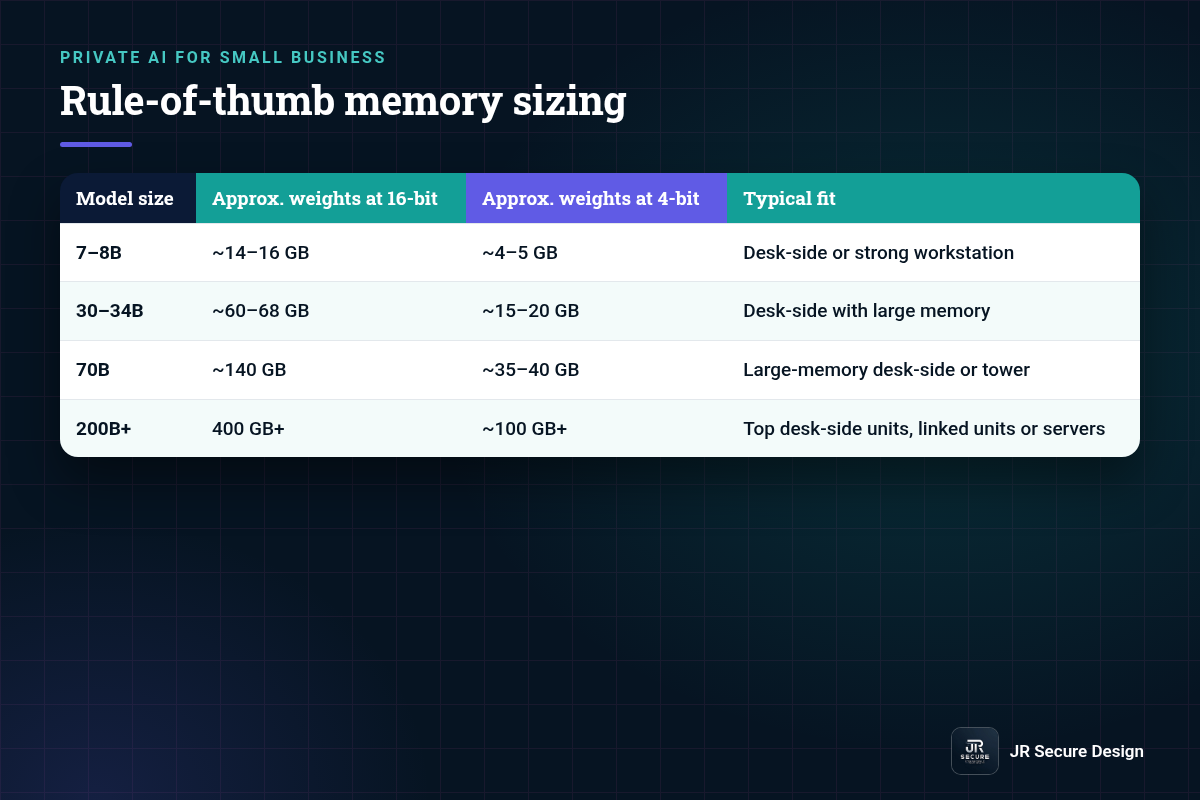
| Model size | Approx. weights at 16-bit | Approx. weights at 4-bit | Typical fit |
|---|---|---|---|
| 7–8B | ~14–16 GB | ~4–5 GB | Desk-side or strong workstation |
| 30–34B | ~60–68 GB | ~15–20 GB | Desk-side with large memory |
| 70B | ~140 GB | ~35–40 GB | Large-memory desk-side or tower |
| 200B+ | 400 GB+ | ~100 GB+ | Top desk-side units, linked units or servers |
Rule-of-thumb math (parameters × bytes per parameter), weights only. Real needs vary by software, context length and number of users.
Is a bigger model always better for a small business?
No. For drafting, summarizing and answering questions from your own documents, a well-tuned mid-size model with good search over your files often beats a giant model with poor setup. Start with the smallest model that does the job well in testing, then move up only if the answers aren’t good enough.
Desk-side, tower or cloud: which on-premise setup fits?
Desk-side AI computers fit small teams that want private use without a server room. Towers and rack servers fit heavier, shared use with more users or bigger models. Cloud fits bursty work and testing, though data leaves your building. Many small businesses start desk-side, keep some cloud for experiments and grow from there.
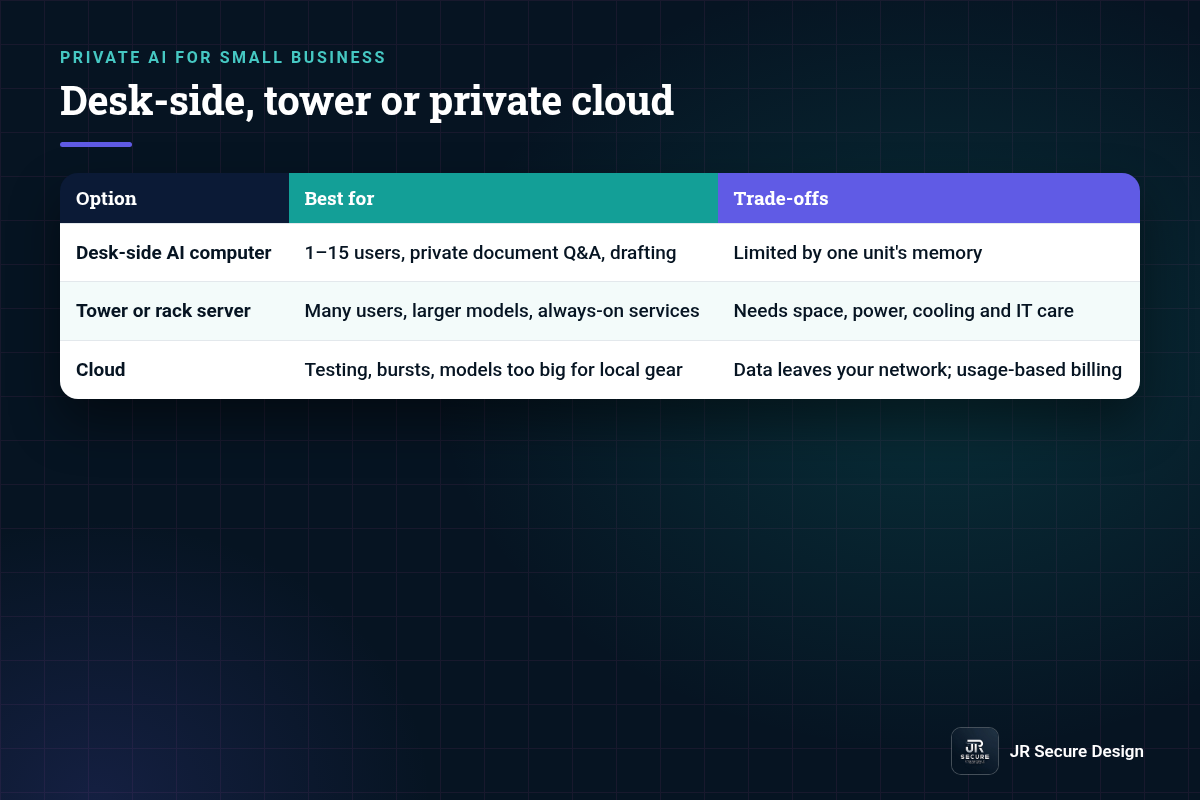
| Option | Best for | Trade-offs |
|---|---|---|
| Desk-side AI computer | 1–15 users, private document Q&A, drafting | Limited by one unit’s memory |
| Tower or rack server | Many users, larger models, always-on services | Needs space, power, cooling and IT care |
| Cloud | Testing, bursts, models too big for local gear | Data leaves your network; usage-based billing |
What can a desk-side unit like NVIDIA DGX Spark handle?
NVIDIA says DGX Spark offers up to 1 petaFLOP of AI performance at FP4 precision and up to 128 GB of unified system memory, in 64 GB or 128 GB configurations. NVIDIA lists inference on AI models up to 200 billion parameters and fine-tuning of models up to 70 billion parameters on one unit.
NVIDIA also says two units can be linked to work with models up to 400 billion parameters. For most small businesses, one unit running a mid-size model is a realistic starting point. Treat these as NVIDIA’s upper limits, not what every workload will reach.
What else does an on-premise LLM need besides hardware?
You need software to run and serve the model, a way for staff to use it, access controls, logging and backups. Plan who can reach the system, which documents it can search and how updates happen. The box is the easy part. Setup, security and day-to-day care decide whether it’s useful and safe.
Before you buy on-premise LLM hardware
- Write down the jobs. Drafting, document Q&A, summarizing, coding help.
- Count the users. How many people at once, at peak?
- Test model sizes. Try a few in the cloud or on a loaner first.
- Size memory with headroom. Use the table above, then add room.
- Plan access. Business accounts, user roles and logging from day one.
- Plan care. Updates, backups and who owns the system.
Example: how might a small law firm size on-premise LLM hardware?
Picture a ten-person law firm that wants to search and summarize its own files without sending them to a public chatbot. A single desk-side unit running a mid-size model, connected to a document index and limited to firm accounts, could cover drafting and research questions. They’d test first and grow only if needed.
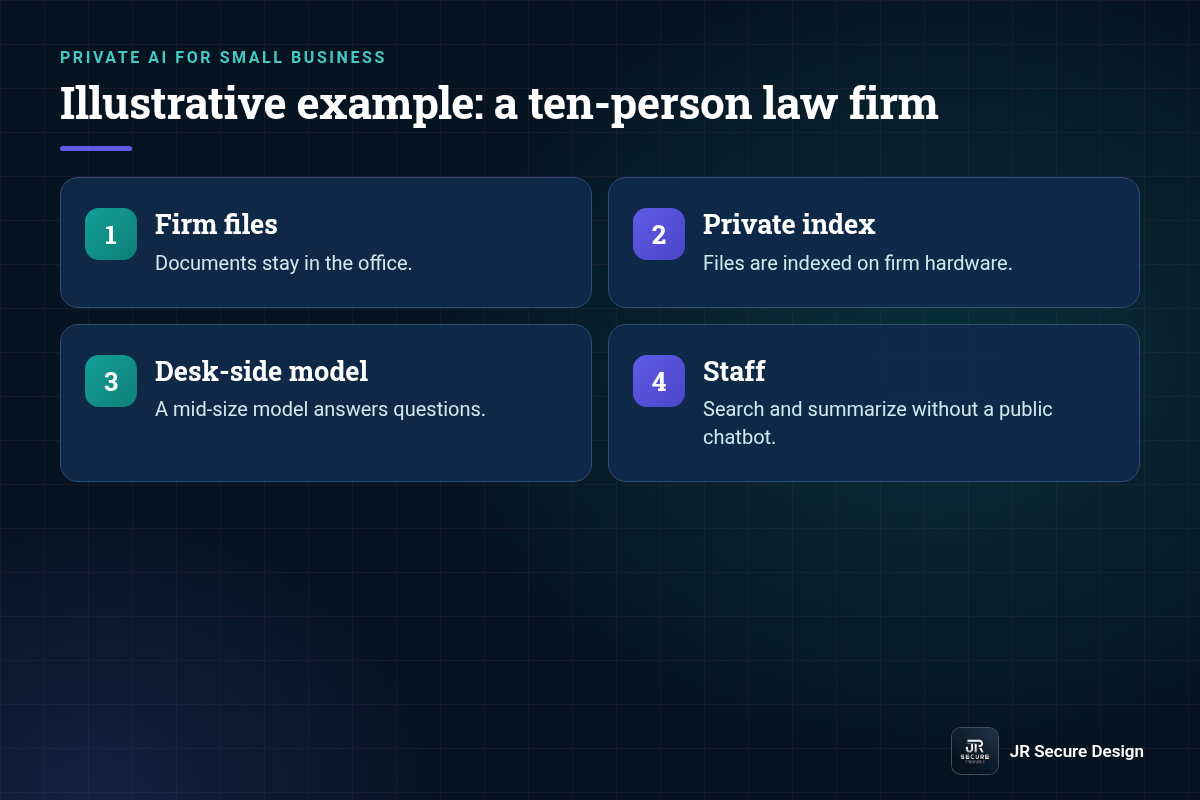
In this illustrative setup, the firm would decide which matters and folders the system can search, keep logs of who asked what, and have a lawyer check every output before it goes to a client. Professional duties still apply, so the firm should check its own rules and obligations before relying on any AI tool.
On-premise LLM: frequently asked questions
Is an on-premise LLM more private than ChatGPT?
It can be, because prompts and documents stay on hardware you control instead of going to an outside service. Privacy still depends on setup: who can access the system, what it can search, how logs are stored and how it’s updated. A poorly secured local server can be riskier than a well-managed business cloud plan.
Can an on-premise LLM work offline?
Yes. Once the model and software are installed, an on-premise LLM can answer questions without an internet connection. You’ll still want a connection now and then for updates and security patches. Some firms keep the AI system on a separate network segment so it can reach internal files but not the open internet.
How many people can share one on-premise LLM?
It depends on the model size, memory and how heavily people use it. A small team asking occasional questions can share one desk-side unit. Many people running long documents at the same time need more memory or more units. Test with your real workload for a week before deciding, and track response times.
Do I need an IT person to run on-premise AI?
You need someone responsible for it, but not necessarily full-time staff. The system needs updates, backups, access reviews and occasional troubleshooting. Many small businesses use an outside partner for setup and ongoing care, with one internal person as the contact for questions and access requests.
Should a small business run AI on-premise or in the cloud?
Choose on-premise when keeping data in your building matters most and use is steady. Choose cloud for testing, occasional heavy jobs or models too large for local gear. Many small businesses do both: private on-premise AI for sensitive documents and the cloud for everything else, with clear rules about which data goes where.
Sizing a private AI setup?
We’ll help you match model size, memory and setup to your real workload. Ask Sophia, our free AI advisor, at jrsecuredesign.com/sophia, or talk with James.
JR Secure Design builds AI and security programs aligned to NIST AI RMF and ISO/IEC 42001. More at jrsecuredesign.com.
Sources: NVIDIA, DGX Spark product page